
Thomas GrowNovember 6, 2025





Review: NordVPN – Your Digital Privacy Guardian (And Virtual World Traveler)
Thomas Grow
November 6, 2025
When was the last time you felt actually private online? Not like “I used incognito mode” private. Really private.
For me? Never. Or at least I’d never really thought about it until recently. We’re swimming in this digital fishbowl where ISPs track literally everything we do. Advertisers are stalking us across the internet like weirdly persistent digital zombies. And hackers? They’re camping out on public Wi-Fi networks waiting for someone – anyone – to check their bank account at Starbucks.
For years I told myself VPNs were overkill. “I’m not doing anything shady,” I’d think. “What do I care if someone sees I’m browsing Reddit at 2am?” But that’s not really the point, is it? Privacy isn’t about having something to hide. It’s about not giving everyone and their mother permission to watch everything you do online. It’s about control.
And honestly? I was getting tired of seeing ads for stuff I’d casually mentioned to my wife show up in my browser ten minutes later. (Yes, I know they say they’re not listening. Sure they’re not.)
That’s where NordVPN comes in.
When Sonny asked me to review NordVPN, I’ll admit I got pretty excited. I’ve cycled through my share of bargain-bin VPNs over the years. You know the ones – names you’ve never heard of, interfaces that look like someone’s high school coding project from 2003, speeds that make dial-up look fast. Some of them worked okay. Most of them didn’t. A few of them made me wonder if they were actually selling my data instead of protecting it.
But NordVPN? That’s the real deal. The kind of VPN that shows up in every “best of” list. The one tech-savvy people actually use and recommend without getting paid to do it. I’d been wanting to properly test it for a while, and this was my shot.
After weeks of using NordVPN on my Mac (version 9.12.0, for those keeping score), I can tell you – this thing delivers.
Spoiler: I’m keeping the subscription. Already added it to my “essential software” list.
Why Bother With a VPN Anyway?
Real talk for a second.
You’re at a coffee shop. Connected to their free Wi-Fi because data caps are still a thing somehow. You check your email, maybe log into your bank account to see if that check cleared. Feels normal, right?
Wrong.
That open network is basically a buffet table for anyone who knows their way around basic hacking tools. They can grab your passwords, peek at your accounts, intercept pretty much everything you’re doing. It’s not even that hard – there are YouTube tutorials for this stuff.
And it’s not just coffee shop Wi-Fi. Your own ISP is tracking every single website you visit. Building a profile on you. In some places they’re straight-up selling that data to advertisers. Or throttling your Netflix because they feel like it. Or handing it over to whoever asks nicely.
A VPN fixes this. All of it.
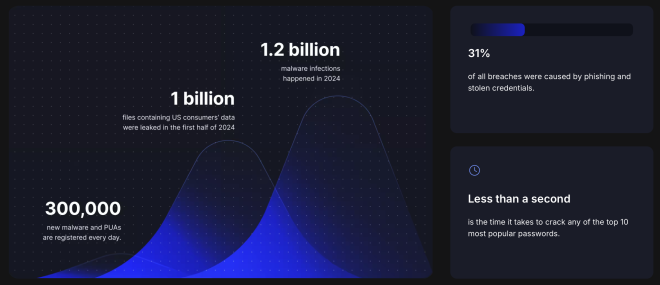
It creates this encrypted tunnel between you and the internet. Everything goes through that tunnel, scrambled up so nobody can see what you’re doing. Your ISP just sees a bunch of encrypted noise. Hackers get nothing. Advertisers lose the trail.
Plus – and this is kind of a fun bonus – you can make it look like you’re browsing from another country. Want to see if that show is available on Netflix UK? Done. Need to check if a website looks different in the US vs Europe? Easy.
Always wanted to virtually visit the Netherlands and look at windmills? Well. I’m wearing wooden shoes right now as I type this, so clearly I’m already living that dream.
Setting This Thing Up (Or: How I Didn’t Pull My Hair Out)
Look, I’m the guy who reads instruction manuals before assembling IKEA furniture. My wife thinks it’s weird. I think it prevents me from having three extra screws and a wobbly table. We agree to disagree.
So when I downloaded NordVPN, I was mentally prepared for complexity. Network configurations, manual server setups, probably some troubleshooting, definitely some cursing.
Yeah, no. Took maybe two minutes.
Download app. Install. Log in. Done.
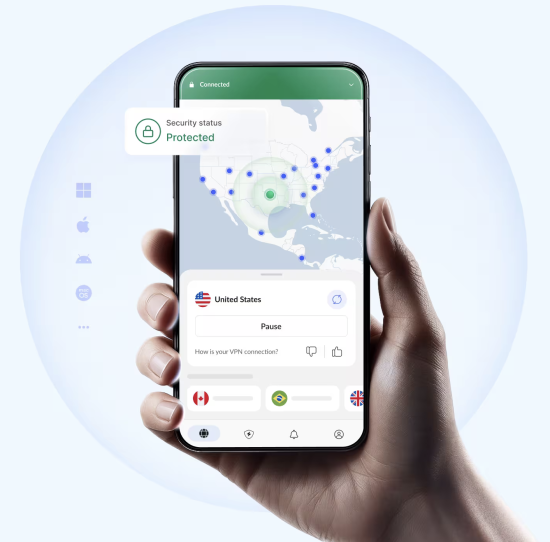
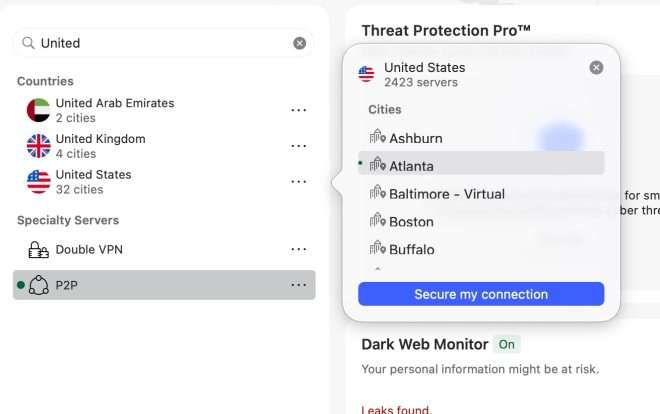
The interface actually makes sense. There’s a simple button that – wild concept here – connects you quickly. A search bar to find specific servers. A sidebar with your recent connections. Everything’s clean and doesn’t look like it was designed by someone who hates users.
It just worked. First try. No drama.
This never happens with tech products. Ever. I was genuinely suspicious.

The Speed Test Marathon (Because Numbers Matter)
Here’s the thing everyone worries about with VPNs – they slow you down. Has to, right? You’re routing all your traffic through an encrypted tunnel to some server God-knows-where. Physics says there’s overhead.
Question is: how much?
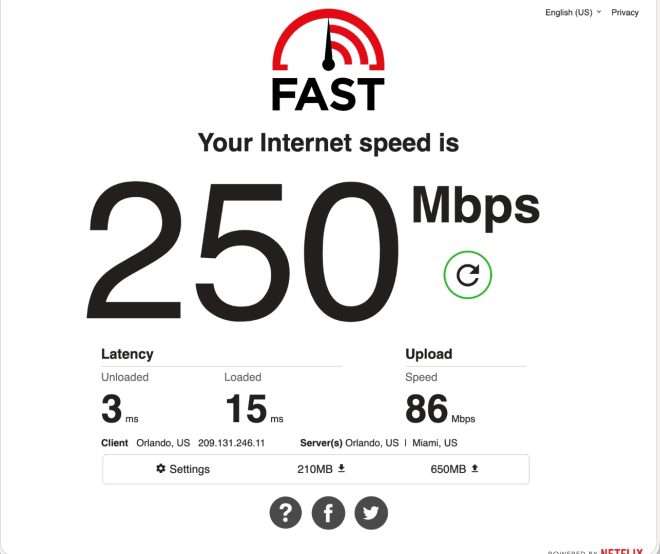
I ran a stupid number of speed tests. My internet here in Florida usually hits around 250 Mbps on a good day. Let’s see what happened when I turned the VPN on.
Baseline Numbers (No VPN)
Had to establish what normal looked like first.
Download came in around 250 Mbps. Upload bounced between 86-216 Mbps depending on which test I ran. Ping sat at 3-4 ms.
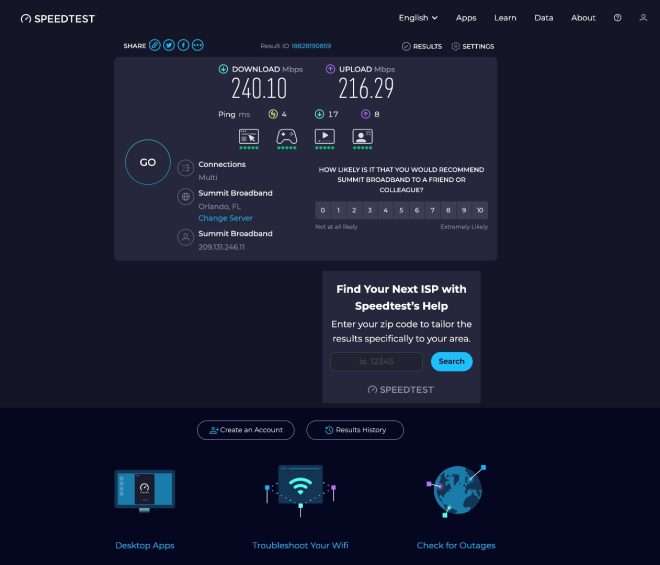
Pretty solid. Now let’s break it.
Miami P2P Server
NordVPN has these specialty P2P servers optimized for file sharing and torrenting. Since I’m in Florida, Miami seemed like the obvious choice – it’s practically my backyard.
Connected. Ran the tests.
230 Mbps down. 230 Mbps up. Latency barely changed.
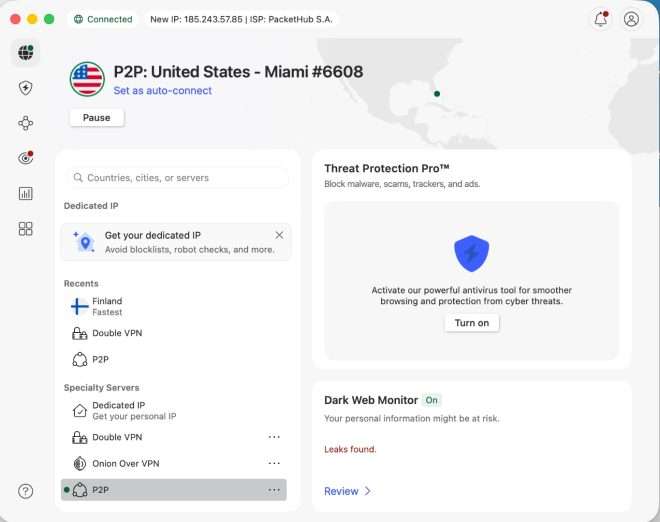
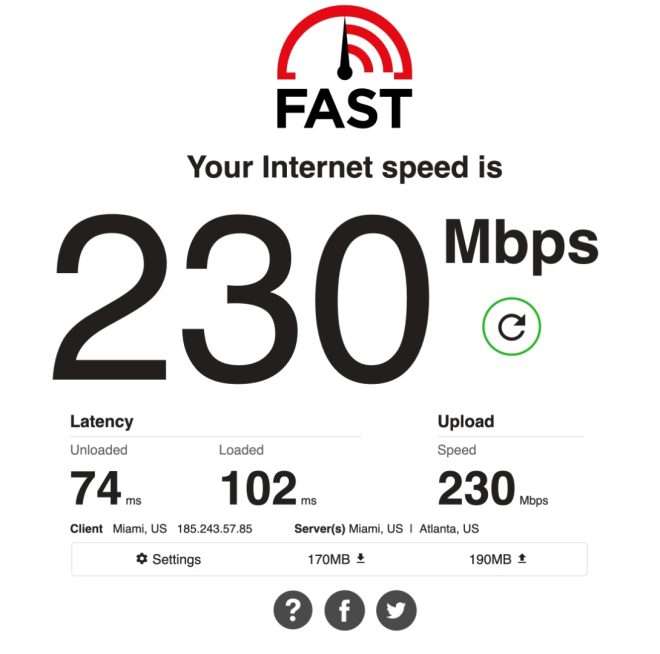
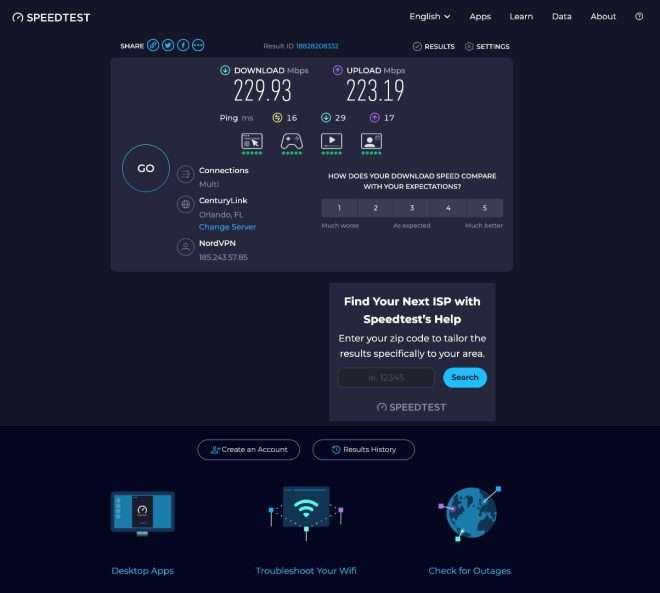
Wait. Hold on.
I lost less than 10% of my speed? With the VPN running? And my upload got more consistent?
Okay, I’m listening now.
Atlanta P2P
Pushed it a bit further. Connected to Atlanta instead.
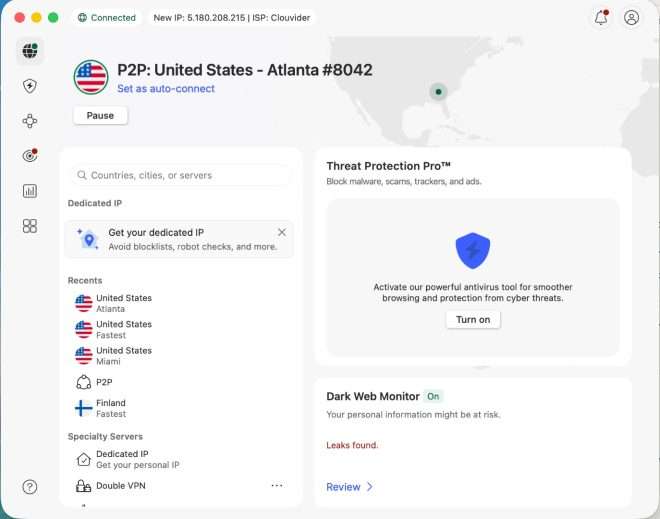
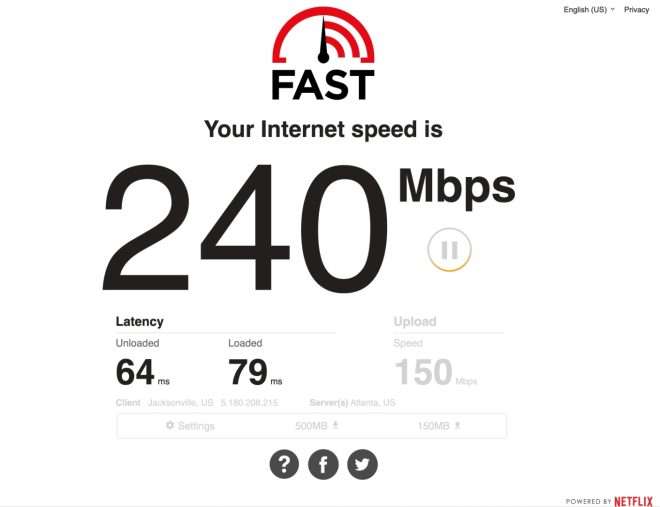
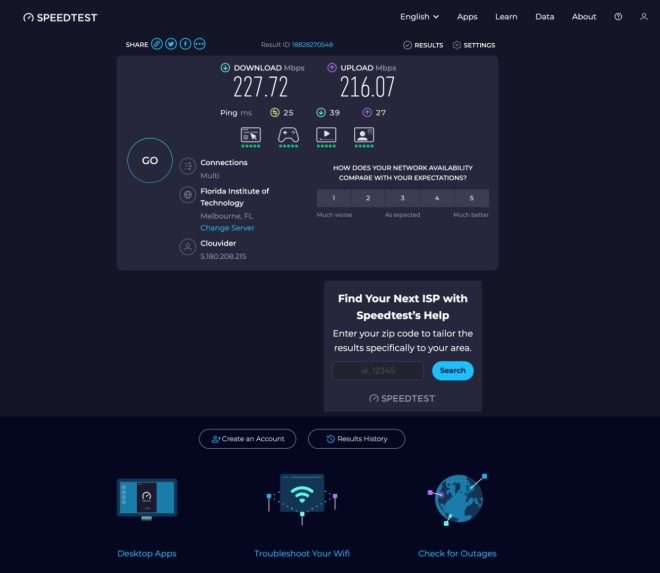
240 Mbps down. Upload varied between 150-216 depending on the test. Ping hit 25ms on Speedtest.
Still barely noticeable. I could stream 4K, hop on video calls, download whatever – all while the VPN was running. Didn’t even think about it after a while.
This is kind of huge.
Double VPN (Maximum Tinfoil Hat Mode)
Now for the cool part. NordVPN has this Double VPN feature where your traffic goes through two servers instead of one. Gets encrypted twice. It’s like wearing two bulletproof vests.
Overkill? Probably.
Cool anyway? Absolutely.
Connected to a Double VPN route through the US and New York. Ran the tests again.
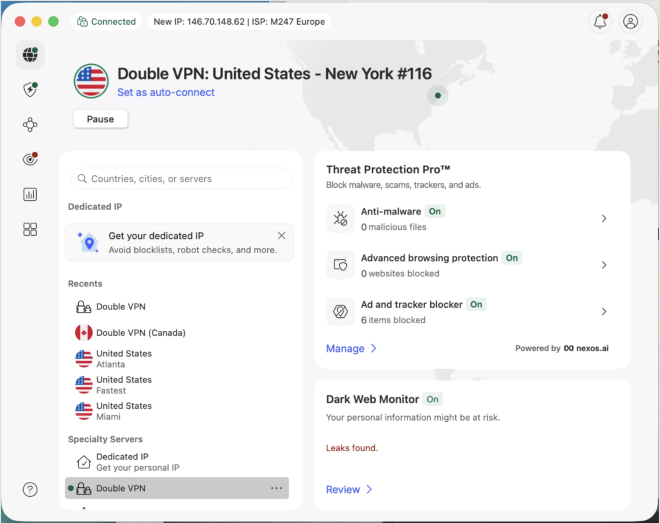
Here’s where I need to be straight with you. Fast.com (Netflix’s speed test) completely refused to work with Double VPN enabled. Just gave me an error. This isn’t necessarily NordVPN’s fault – Netflix is notoriously aggressive about blocking VPNs because they don’t want people jumping geographic restrictions.
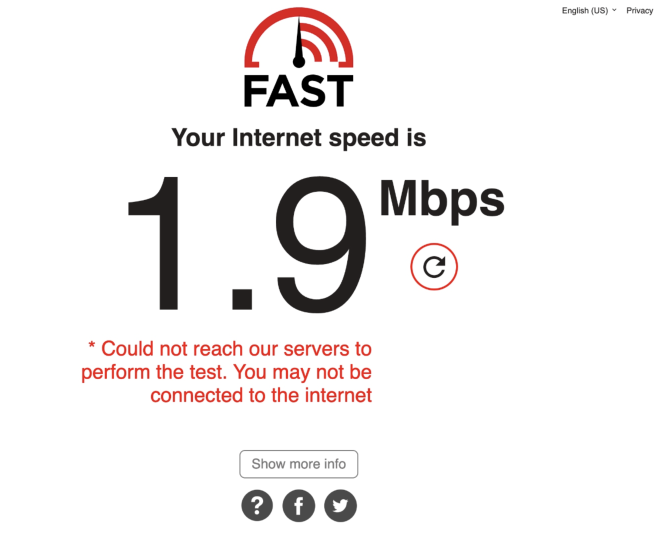
Speedtest.net worked fine though, which is what you’re seeing below.
223 Mbps down. 112 Mbps upload. 77ms ping.
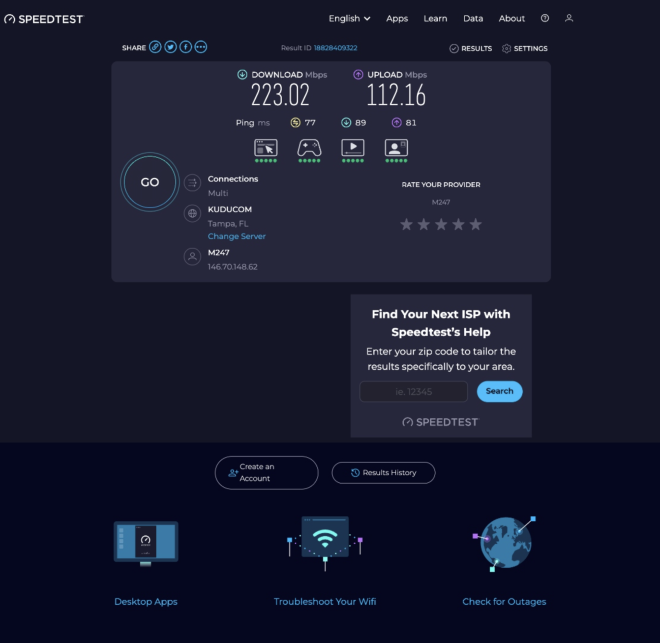
The speed hit is more obvious here, especially upload and latency. But if you’re using Double VPN, you’re choosing privacy over raw speed anyway. And 223 Mbps is still plenty fast for anything you’d actually want to do.

Amsterdam (Because Wooden Shoes)
Final test. Wanted to see how an international connection performed.
Connected to a P2P server in Amsterdam. I’ve always wanted to visit the Netherlands and see those windmills and tulips in person. These wooden shoes I mentioned earlier? Not just for the bit.
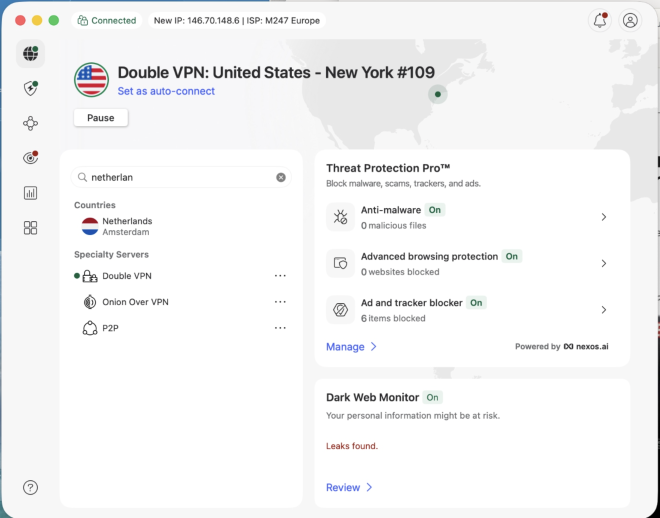
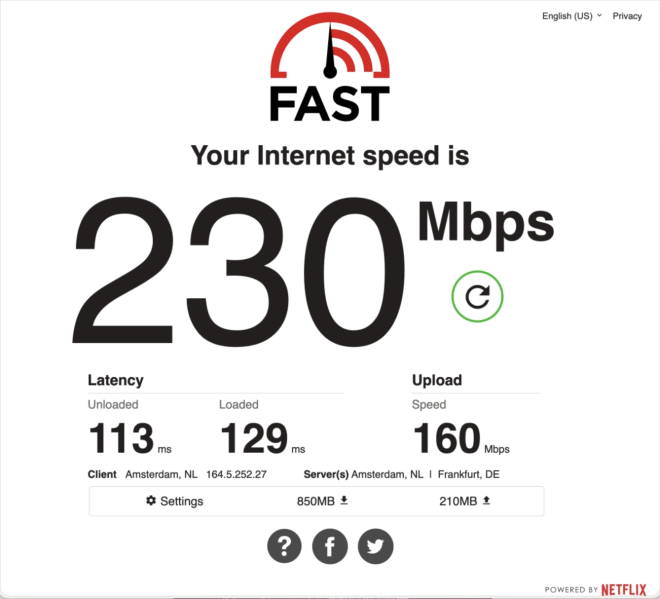
230 Mbps down. 160 Mbps up. Latency jumped to 113-129ms.
My traffic just made a 4,600-mile round trip and I’m still getting 230 Mbps download.
What.
The latency increase makes sense – that’s actual physical distance. But the speeds? Barely budged.
So What Does This All Mean?
Across every test – local servers, cross-country, Double VPN, international – NordVPN kept at least 89% of my baseline speeds.
For normal internet use? You won’t notice the VPN is even running. Streaming works. Gaming works. Video calls work. Everything just… works.
Which is exactly what you want.
What Else You Get (Besides Speed)
Okay so the speed thing is handled. But NordVPN throws in a bunch of extra features that actually matter. Not gimmicks. Real stuff.
Threat Protection Pro
This is their security suite built right into the app. Three main things it does:
Scans files when you download them and blocks malware. Stops you from loading sketchy websites before they even open. And blocks ads and trackers.
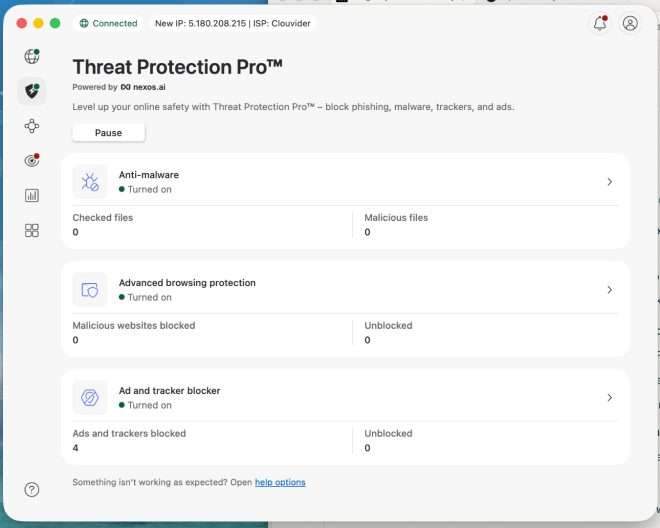
I’ve had it running this whole time and it’s blocked 6 trackers without me even noticing. Just quietly doing its job in the background. The ad blocking alone makes browsing so much better – no more accidentally clicking those fake download buttons on software sites. You know the ones.
Dark Web Monitor
This one’s kind of cool and kind of creepy at the same time.
It scans dark web databases and hacker forums looking for your email address. If your info shows up in a data breach somewhere, it alerts you.
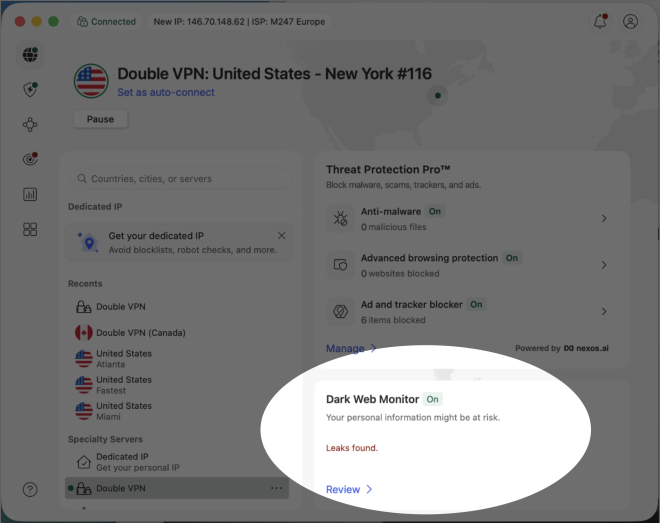
During my testing it found some leaks. Which… yeah, that was unsettling. But better to know than not know, right? Gives you a heads-up so you can change passwords and enable two-factor auth before something bad happens.
This is the kind of proactive security thing that can actually prevent identity theft instead of just reacting to it after the fact.
Kill Switch
This one’s critical if you’re serious about privacy.
If your VPN connection drops for any reason, the Kill Switch automatically blocks your internet. Prevents your real IP address and browsing data from leaking out even for a second.
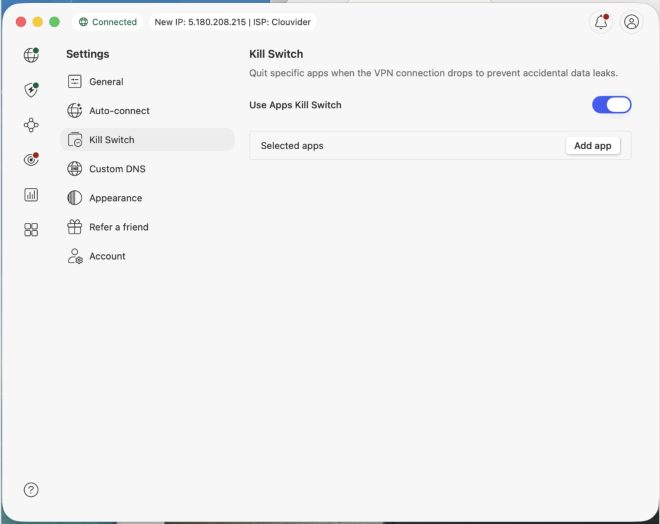
NordVPN’s version is app-level, meaning you can pick which apps get killed if the VPN drops. Perfect for protecting specific things – torrenting, work documents, whatever – while letting other apps keep running normally.
Specialty Servers
Beyond regular servers, they’ve got these specialty options built in. Double VPN routes you through two servers for extra encryption (we tested this earlier). Onion Over VPN combines VPN with the Tor network for maximum anonymity. P2P servers are optimized for file sharing. Obfuscated servers disguise your VPN traffic as normal traffic – useful if you’re somewhere that tries to block VPNs.
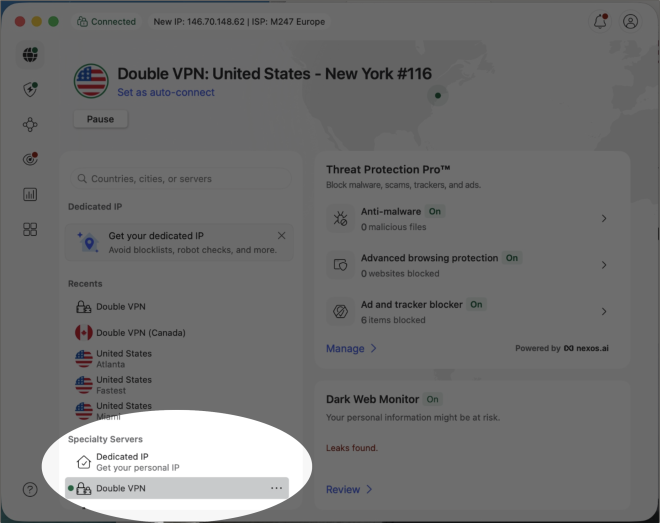
The fact that you can just toggle these on without needing a computer science degree is pretty great. Advanced security made accessible.
The Small Stuff That Adds Up
After using this for a few weeks, I started noticing little touches that show someone actually thought about how people use this thing.
Recent connections get saved so you can reconnect to your favorites with one click. Super convenient when you’re bouncing between the same few servers. (I kept using Miami and Atlanta for testing – having them right there in my Recents was nice.)
Server load indicators show you which servers are crowded so you can avoid slow ones.
Auto-connect can turn the VPN on automatically when you start your computer or join sketchy Wi-Fi networks. Set it and forget it.
One subscription covers 6 devices simultaneously. Laptop, phone, tablet, whatever. No juggling accounts or disconnecting one to use another.
24/7 customer support is there if you need it. I didn’t – everything worked – but it’s good to know it exists.
Being Honest About What Didn’t Work
I need to mention something that happened during testing because transparency matters.
Fast.com wouldn’t work with Double VPN enabled. Just threw an error.
I could’ve skipped this part. Pretended it was all perfect. But that’s not how real testing works.
Fast.com is run by Netflix. They’re aggressive about detecting VPNs because they don’t want people bypassing geographic restrictions. Some services just don’t play nice with certain VPN configs, especially double encryption.
Speedtest.net worked fine though. And in regular daily use with Double VPN, I didn’t hit any other issues. Websites loaded, streaming worked, email was fine. The Fast.com thing was an outlier.
Real-world testing isn’t perfect 100% of the time. But overall? NordVPN crushed it.
Who Actually Needs This?
After all this testing, here’s who benefits most:
You use public Wi-Fi at coffee shops or airports. Your ISP’s tracking habit bothers you. Maybe you want to watch shows only available in other regions, download files privately, or lock down your remote work connection. Or maybe you just don’t love the idea of everyone watching what you do online. (That last one really should be everyone.)
Who might not need it? If you literally never leave your house, only use your home internet, and don’t care about privacy or security. That’s… a pretty short list.
I’m struggling to think of reasons why someone SHOULDN’T use a VPN in 2026. The internet has gotten so invasive that a VPN feels less like a luxury and more like a necessity. Like antivirus software or a password manager – just part of being online now.
What I Actually Think After All This
Started this review skeptical. Ending it convinced.
NordVPN isn’t just good. It’s excellent. Delivers on everything it promises.
The speeds are outstanding – retained 90% or more of my baseline in most tests. That’s the kind of performance where you forget the VPN is even running. It just quietly does its job in the background.
The features go way beyond basic VPN stuff. Threat Protection Pro, Dark Web Monitor, Kill Switch, specialty servers – these aren’t thrown in as marketing fluff. They’re genuinely useful tools that give you more control and better security. And it’s all built into the app. No separate downloads or complicated configs. Just there, ready to use.
The ease of use impressed me most. Didn’t need a manual (though I probably would’ve read it anyway). No troubleshooting. No hours of fiddling with settings. Install, connect, done. Technology should work like this.
Is it perfect? No. The Fast.com hiccup with Double VPN was a thing. Interface text could maybe be bigger for those of us with aging eyes. (Or maybe I just need to admit I need reading glasses.) But these are tiny complaints compared to everything it does right.
Should You Actually Get This?
Bottom line.
Your online privacy is under constant attack in 2026. ISPs, advertisers, hackers – everyone wants a piece of your data. You can accept that and hope for the best, or you can take control with something designed to protect you.
NordVPN is that something.
Fast enough you won’t notice it. Secure enough to actually protect you. Packed with features that matter. Easy enough that you don’t need a tech degree.
Peace of mind alone makes it worth the cost. Add in the performance, features, and reliability? No-brainer.
What It Costs
NordVPN has a few subscription options. Monthly plan gives you flexibility but costs more per month. 1-year plan has better value with a decent discount. 2-year plan is the best deal with significant savings.
The monthly plan is priced as a premium product. But commit to a longer subscription and the per-month cost drops a lot. Like 70% off a lot. Plus it protects 6 devices, so that’s actually pretty solid value.
They offer a 30-day money-back guarantee too. Try it risk-free. Don’t like it? Get your money back. No hassle. (Though I’m betting you’ll keep it.)
Check NordVPN’s official website for current pricing and deals.
Oh, by the way, guess what… I found it SIGNIFICANTLY more affordable on the official NordVPN Amazon storefront!
Final Thoughts
Using NordVPN changed how I think about online privacy.
I used to think VPNs were for super technical people or folks doing questionable things online. That’s wrong. VPNs are for anyone who values their privacy, wants control over their data, and doesn’t want to be constantly tracked and monetized by every company on the internet.
After testing this extensively, this is the VPN I’m recommending to friends and family. It’s the one staying on my devices. It’s the one I think you should seriously consider if you’re looking for a VPN.
Your data, your browsing history, your privacy… all yours.
NordVPN helps you keep it that way.
Now excuse me while I take off these wooden shoes and book an actual trip to the Netherlands. (NordVPN made me feel like I was there, but apparently the real tulips are better than the virtual ones. Who knew?)

advertising
Similar articles


Comments
Don't miss our best reviews
Occasional updates, only when we have something worth sharing
Occasional updates, only when we have something worth sharing

Thanks for your message!
We’ve received it and will get back to you soon.